Why You Need an XML to HTML Converter
Do you have XML files that you want to show on your website? XML is a way to store data in a structured format. But, browsers cannot read XML directly. To make it visible and neat, you need an XML to HTML Converter.
This tool helps you convert XML data into HTML format so you can display it on web pages. Beginners, bloggers, and developers can all benefit from it.
In this guide, you will learn:
- What an XML to HTML Converter is
- How it works step by step
- Free online tools and examples
- Best practices for using it
- FAQs to answer common questions
By the end, you will know how to turn any XML data into readable HTML, even if you have no coding experience.
What is XML and HTML?
Before we start converting, let’s understand XML and HTML:
XML (eXtensible Markup Language)
- XML is used to store and transport data.
- Data is stored using tags like
<name>John</name>. - XML is readable for computers, but not always easy for humans to read.
HTML (Hypertext Markup Language)
- HTML is used by browsers to display web pages.
- It shows content in a visual format that users can read easily.
- Example:
<p>My name is John</p>displays text on a web page.
Why Convert XML to HTML?
- XML is not visually appealing.
- HTML makes XML readable and usable on websites.
- Conversion helps display tables, lists, and structured content easily.
How Does an XML to HTML Converter Work?
An XML to HTML Converter is a tool that automatically changes XML code into HTML.
Step 1: Prepare Your XML File
- Make sure your XML is complete and correct.
- Use an XML parser to check for missing tags or errors.
Step 2: Choose a Converter Tool
- Use online tools or desktop software.
- Online tools are best for small files; desktop software works well for large XML data.
Step 3: Paste or Upload XML
- Copy your XML data into the tool or upload the XML file.
Step 4: Convert XML to HTML
- Click the Convert button.
- The tool reads your XML and produces clean HTML code.
Step 5: Copy and Use HTML
- Copy the HTML code or download it as a file.
- Paste the HTML into your website, blog, or WordPress page.
Tip: Preview HTML in a browser to make sure it looks correct.
Common Use Cases for XML to HTML Conversion
- Web Development
- Convert product XML feeds into HTML tables for e-commerce sites.
- Display news or blog posts stored in XML on your website.
- Blogging
- Turn XML content into web-friendly HTML pages without coding.
- Business Data
- Convert XML inventory files to HTML tables for websites.
- Educational Purposes
- Transform XML lesson plans or study materials into HTML pages for students.
- Reports and Dashboards
- Use XML data from software to create readable HTML reports.
Popular Online XML to HTML Converter Tools
Here are some beginner-friendly tools:
| Tool Name | Features | Website |
|---|---|---|
| Code Beautify | Converts XML to HTML, supports tables and formatting | codebeautify.org |
| FreeFormatter | Simple interface, online, free | freeformatter.com |
| Convert Town | Upload XML, get HTML code easily | converttown.com |
| Text Fixer XML Converter | Small XML files, quick conversion | textfixer.com |
Always choose tools that process data locally in your browser to ensure privacy and security.
Step-by-Step Example of XML to HTML Conversion
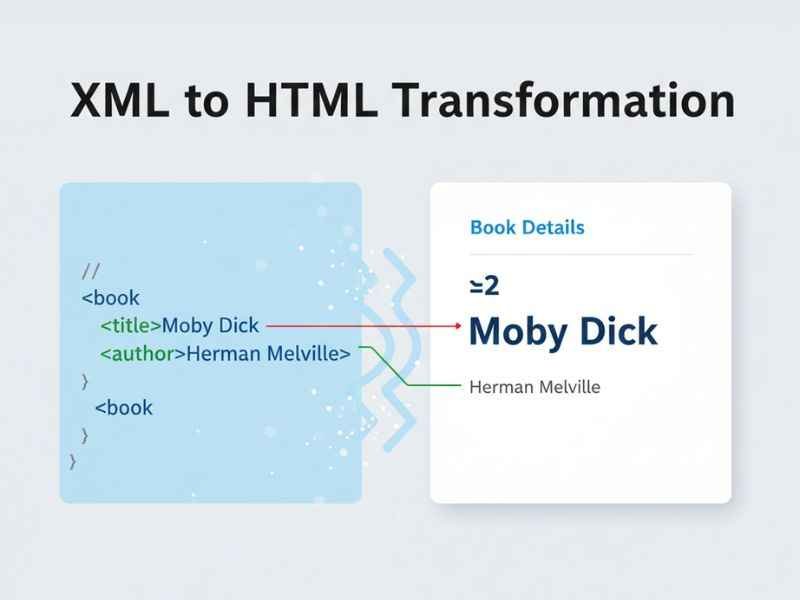
Let’s convert a simple XML example:
XML Input:
<books>
  <book>
    <title>Learn XML</title>
    <author>John Smith</author>
    <year>2023</year>
  </book>
  <book>
    <title>HTML Basics</title>
    <author>Jane Doe</author>
    <year>2022</year>
  </book>
</books>
HTML Output After Conversion:
<div class="book">
  <h2>Learn XML</h2>
  <p>Author: John Smith</p>
  <p>Year: 2023</p>
</div>

<div class="book">
  <h2>HTML Basics</h2>
  <p>Author: Jane Doe</p>
  <p>Year: 2022</p>
</div>
Explanation:
- Each
<book>in XML becomes a div block in HTML. <title>becomes a heading<h2>.<author>and<year>become paragraphs.- This HTML is readable in browsers and ready for WordPress or any website.
Tips for Using an XML to HTML Converter
- Validate XML First
- Use an XML parser to check for missing tags or errors.
- Backup Your XML Data
- Always keep a copy before converting.
- Format HTML Output
- Check for indentation, proper
<div>or<table>structure.
- Check for indentation, proper
- Test HTML in a Browser
- Ensure it displays correctly on your website.
- Use for SEO-Friendly Content
- Clean HTML helps Google read your website better.
Advanced Tips for Developers
- Use XSLT (Extensible Stylesheet Language Transformations) for large XML files.
- Automate XML to HTML conversion for dynamic websites.
- Combine with CSS for beautiful presentation of data.
- Convert XML to HTML tables for data dashboards or reports.
Understanding XML Parsers
An XML parser is a program that reads XML and checks for errors.
Types of XML Parsers:
- DOM Parser – Reads XML into a tree structure. Good for small files.
- SAX Parser – Reads XML line by line. Ideal for large files.
- StAX Parser – Streaming parser for advanced use.
Why Parsers Matter:
- They prevent errors before converting XML to HTML.
- Make your HTML output clean and accurate.
Why Use an XML to HTML Converter?
- Saves Time: Converts files in seconds.
- No Coding Needed: Perfect for beginners.
- Clean Output: Produces readable HTML ready for websites.
- Supports Large Data: Handles multiple entries or complex XML.
- Improves User Experience: Visitors can read content easily.
- SEO Friendly: Search engines can crawl structured HTML better.
Frequently Asked Questions (FAQs)
Q1: What is an XML to HTML Converter?
It is a tool that changes XML data into HTML code that browsers can display.
Q2: Can beginners use it?
Yes, anyone can use it. No coding is required.
Q3: Are online converters safe?
Yes, if the tool works in your browser and does not upload files.
Q4: Can I convert large XML files online?
Some tools allow large files, but desktop tools are better for very big XML files.
Q5: Can I use the converted HTML in WordPress?
Yes. Copy the HTML and paste it into a Custom HTML block.
Q6: Can I edit HTML after conversion?
Absolutely. You can add CSS, change tags, or customize content.
Q7: How do I check if XML is valid?
Use an XML parser before conversion to ensure all tags are correct.
Q8: Can I automate XML to HTML conversion?
Yes. Developers can use scripts or XSLT for automatic conversion.
Q9: Why is HTML formatting important?
Proper formatting makes content readable and helps search engines crawl your site.
Q10: Are there free XML to HTML converters?
Yes, tools like Code Beautify, FreeFormatter, and Convert Town are free to use.
Conclusion
An XML to HTML Converter is an essential tool for anyone working with XML data. Whether you are a beginner or a professional, it helps you:
- Save time and effort
- Display XML data as readable HTML
- Improve website design and user experience
- Ensure SEO-friendly content
Remember to validate your XML, choose the right converter, format your HTML, and preview before publishing.
With this guide, you now have a complete understanding of XML to HTML conversion, examples, tips, and FAQs to help you use the tool confidently.

Emma Rose is a simple, clear, and helpful writer at Blogtime. She enjoys creating easy-to-read articles on tech, lifestyle, travel, and everyday tips. Emma’s goal is to make learning simple for everyone by explaining ideas in friendly and easy words. When she’s not writing, she loves reading, exploring new places, and finding inspiration in everyday life.